
UpstreamSample custody for oil & gas

The system of record for rock and fluid samples.

Find any sample, prove every move, and track every trip to the lab and back. Built for storage operators, national oil companies and the labs that work with them.

Book a demo
Runs in the browser and on any phone Nothing to install for warehouse crews
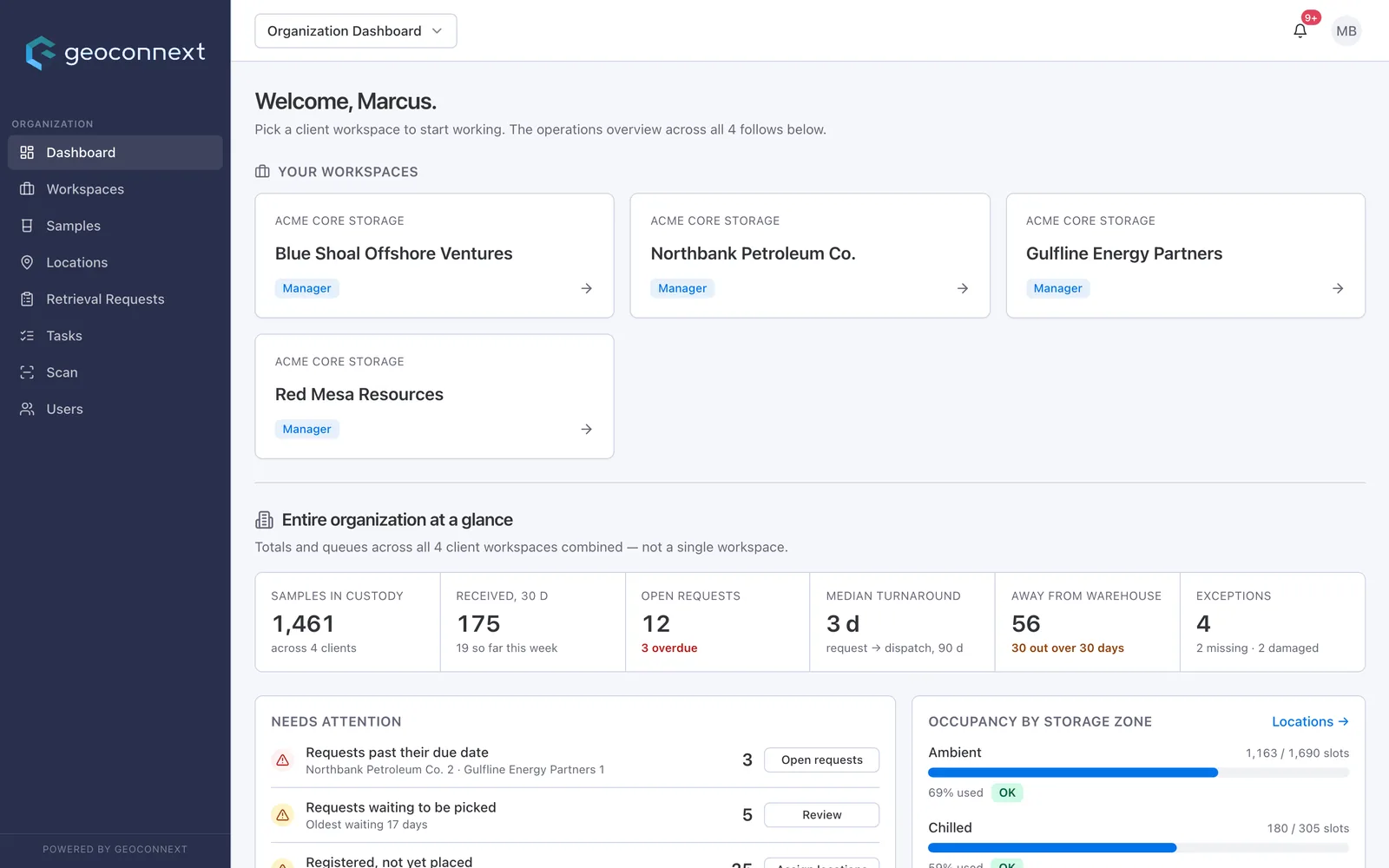
Geoconnext organization dashboard: 1,461 samples in custody across four clients, a needs-attention queue and storage occupancy by zone.
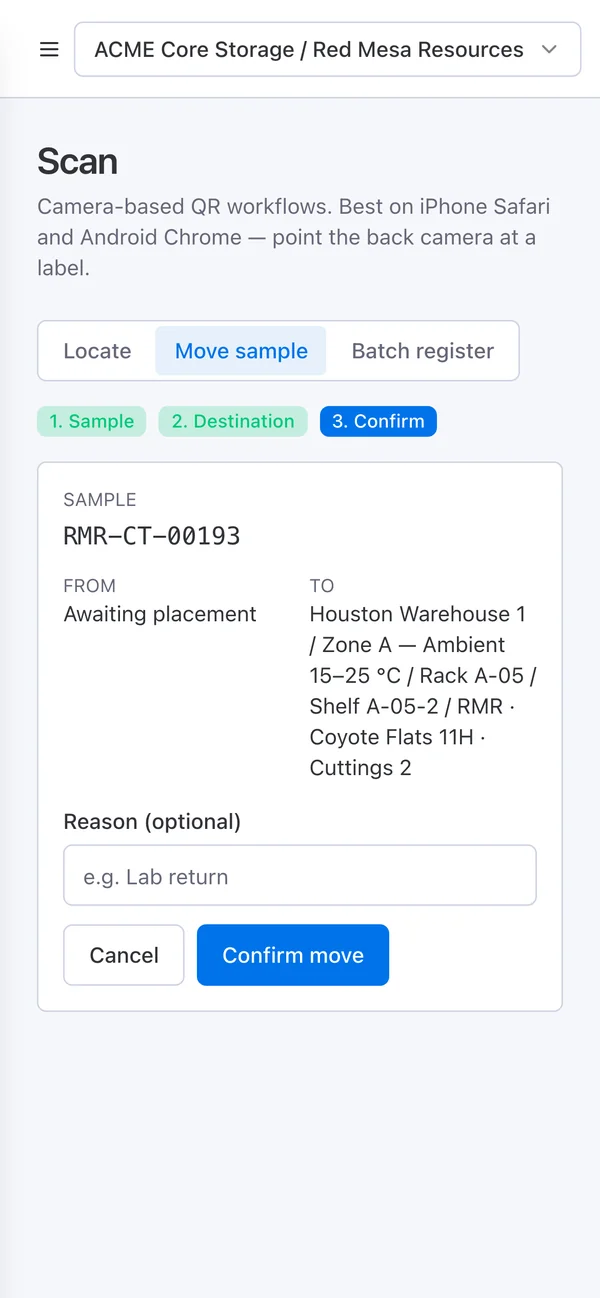
Geoconnext on a phone confirming a scanned sample's move onto its shelf.

Real Geoconnext screens, fictional demo data

Every sample type you keep. Every storage condition.

Configurable types · API RP 40 conditions · MD depth intervals

  • Dry cuttings Ambient
  • Wet cuttings Ambient
  • Sidewall cores Chilled
  • Conventional cores Chilled
  • Core plugs
  • Oil Chilled
  • Gas
  • Formation water
  • Drilling mud
  • Thin sections
  • Iso jars
  • Iso tubes
  • XRD powders
  • QR and barcode labels
  • PPDM-aligned wells
  • Measured-depth intervals
  • Parent → child lineage
  • Remaining quantity in g, kg, mL, L, cm, m
  • Ambient, chilled and frozen storage
  • Bay › Rack › Shelf › Slot
  • Custody on every move
Four platform layers stacked like rock strata: people, workflows, the sample record, and a secure multi-tenant foundation.
How it fits together

One record underneath everything.

Every scan, request and report reads from the same sample record. Underneath it, a foundation that keeps each client's data apart.

Scroll to drill down through the layers

Layer 1 of 4

Geoconnext by the numbers

Shelf to record
2scans

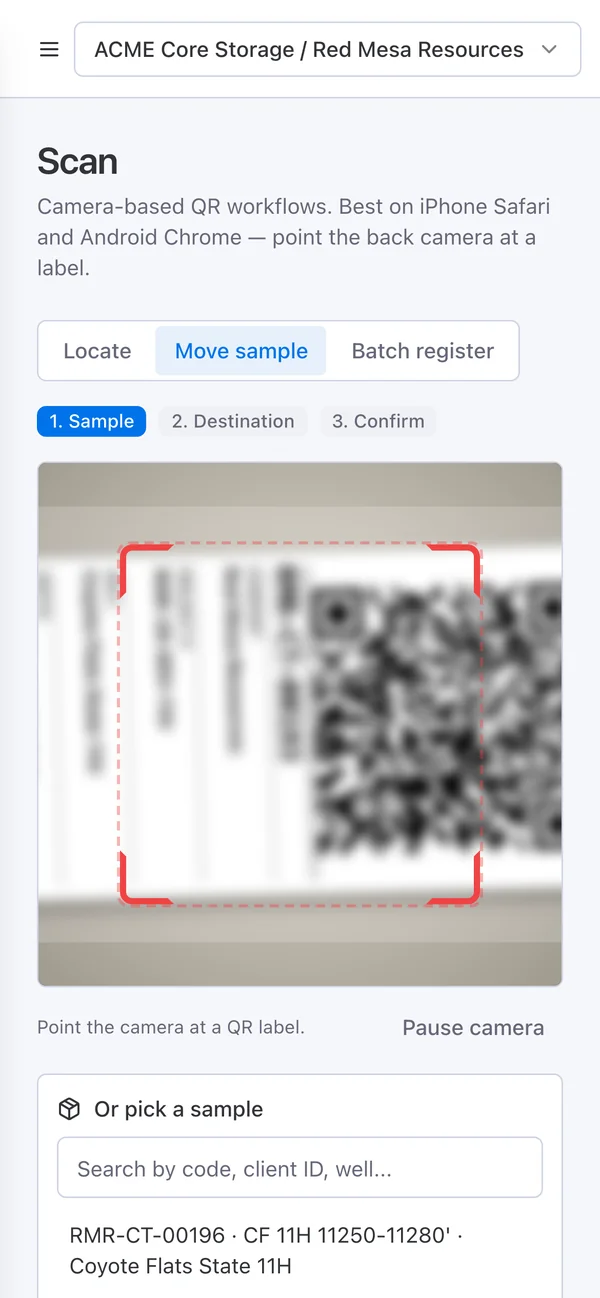
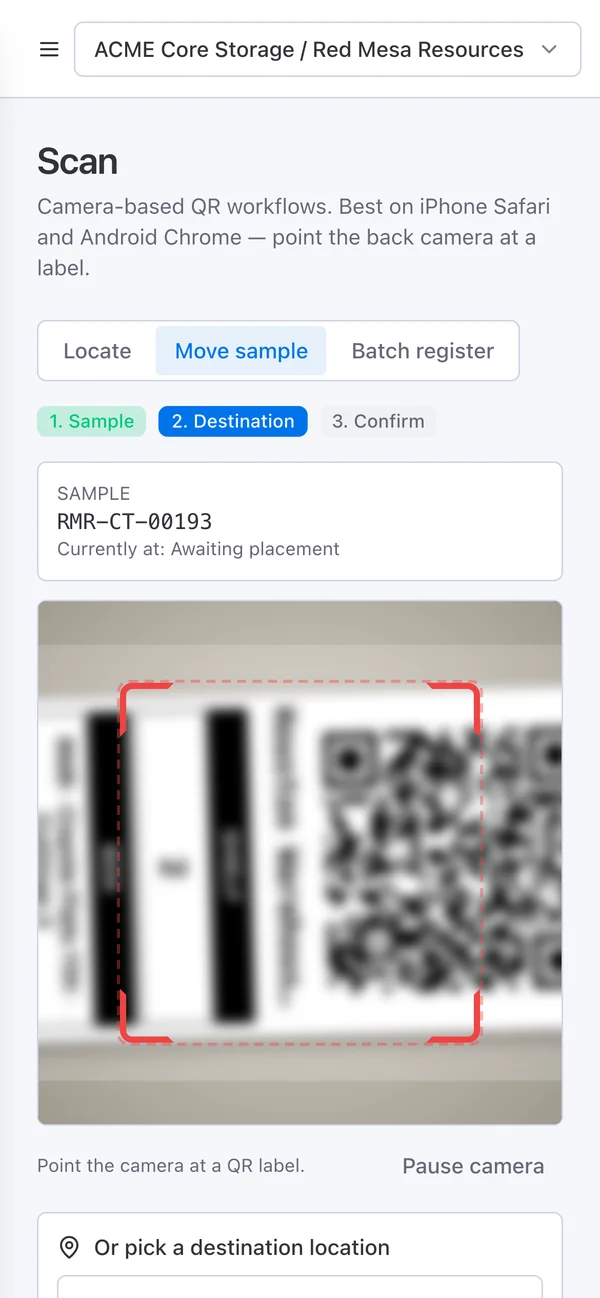
Scan the sample, scan the shelf, confirm. Geoconnext checks shelf capacity, updates the location and writes the custody event with who, when and where.

How a move works in the product: sample scan → location scan → confirm.
3

storage conditions tracked on every sample and location: ambient, chilled and frozen.

12

custody event types, each timestamped and attributed to a person.

7-day

point-in-time recovery window, plus daily and weekly backups.

0

records shared between client workspaces. The isolation rules have their own automated test suite.

See it with your samples

Put every sample on the record.

Bring your sample types, your locations and your workflow. We'll show you how they map in a 45-minute walkthrough.

Book a demo
Warehouse & scanLive

Two scans from shelf to record.

Crews scan the sample, scan the location, and confirm. Geoconnext checks capacity, updates the location tree and writes the custody event. No clipboard, no re-keying at the end of the shift.

0apps to install. Crews scan with the phone's camera, in the browser.
See it on your warehouse layout
Step 1 on a phone: the camera aimed at a cuttings sample's QR label. Step 2: sample RMR-CT-00193 identified, camera aimed at the destination box label. Step 3: from and to shown, ready to confirm the move.

QR and barcode labels

Print one label or a whole batch, then reprint any label from its sample or location record.

Location tree with capacity

Model bays, racks, shelves and slots. A move into a full shelf is stopped before it's saved.

Bulk register and move

Register samples in batches and assign locations in bulk, so a legacy store gets tagged as crews work through it.

Retrieval & dispatchLive

Samples leave the warehouse. The record goes with them.

Clients request samples from their own portal. Managers assign the work, crews pull and dispatch the samples to the lab, and each one is checked back in with its condition and a shelf.

1timeline per sample, from the first request to the return check-in.
Walk through a retrieval
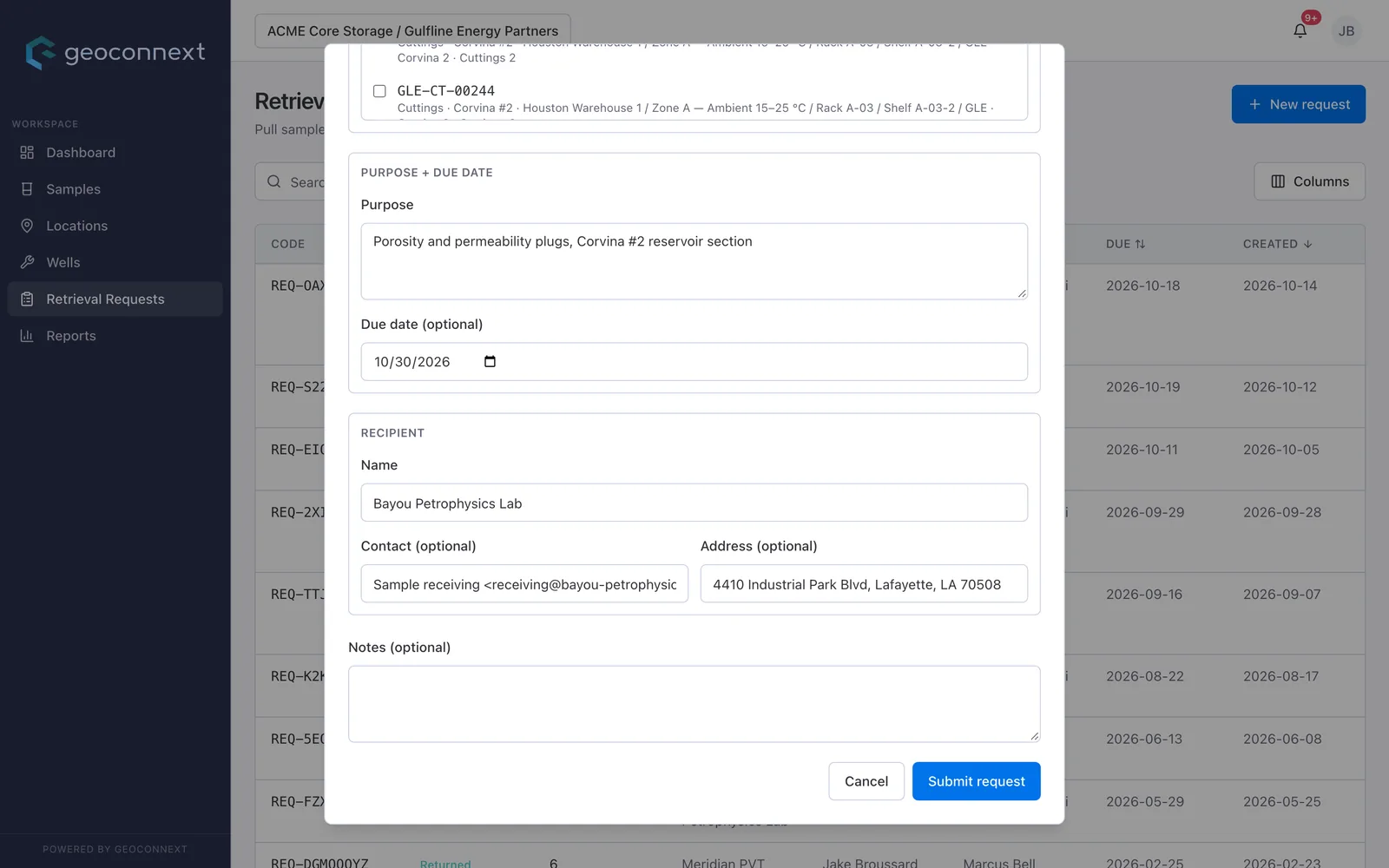
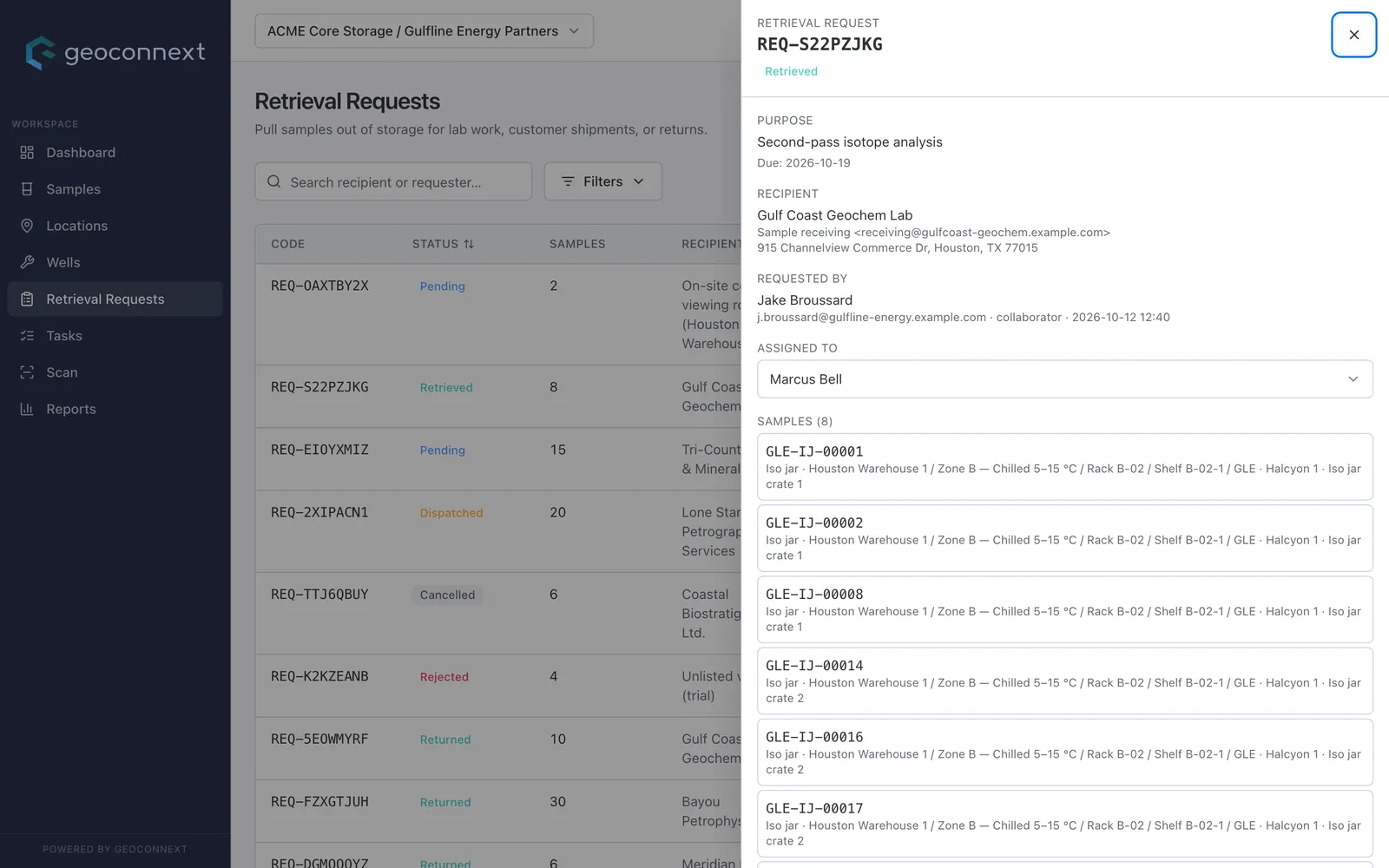
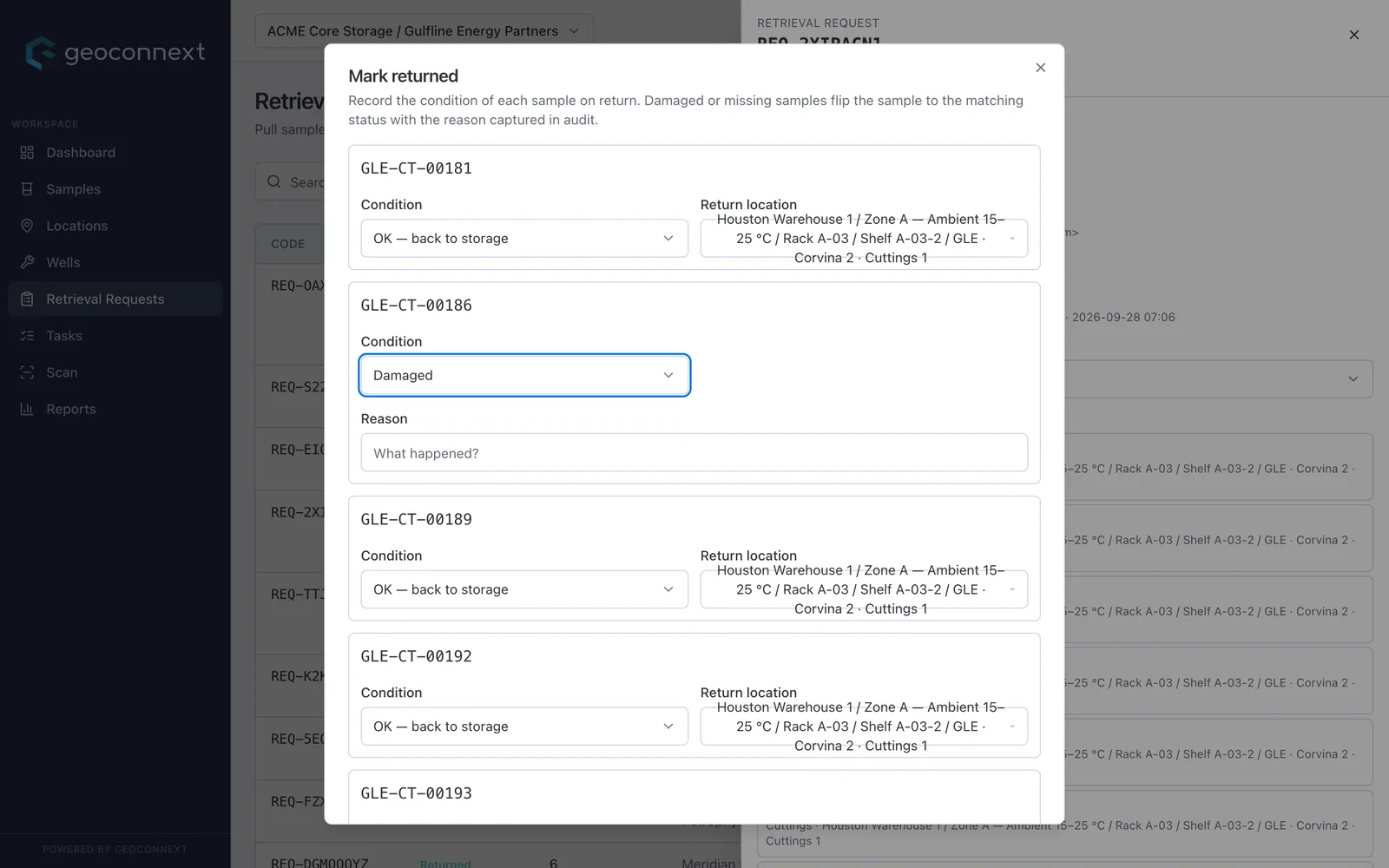
A client geologist's new retrieval request: purpose, due date and recipient lab, ready to submit. A retrieval request as the warehouse manager sees it: recipient lab, requesting client user and assignee. The return check-in: a condition and a return shelf for each sample, with one flagged as damaged.

Approvals built in

Requests wait for a manager before anything leaves a shelf. Rejections and cancellations stay on the record.

Condition checks on return

Every returned sample is checked in with its condition and a destination shelf. Damage is flagged, not forgotten.

Lineage and balance

Cut plugs or thin sections from a parent. Its remaining quantity is debited and low stock is flagged.

Client portalsLive

Give every client a live window into its own samples.

NOCs, IOCs and regulators see their samples, status and history as it happens, and can request a retrieval without a phone call. Each client workspace is walled off by the database's security rules on every read and write.

0records visible across client workspaces. The isolation rules have their own automated test suite.
How isolation works
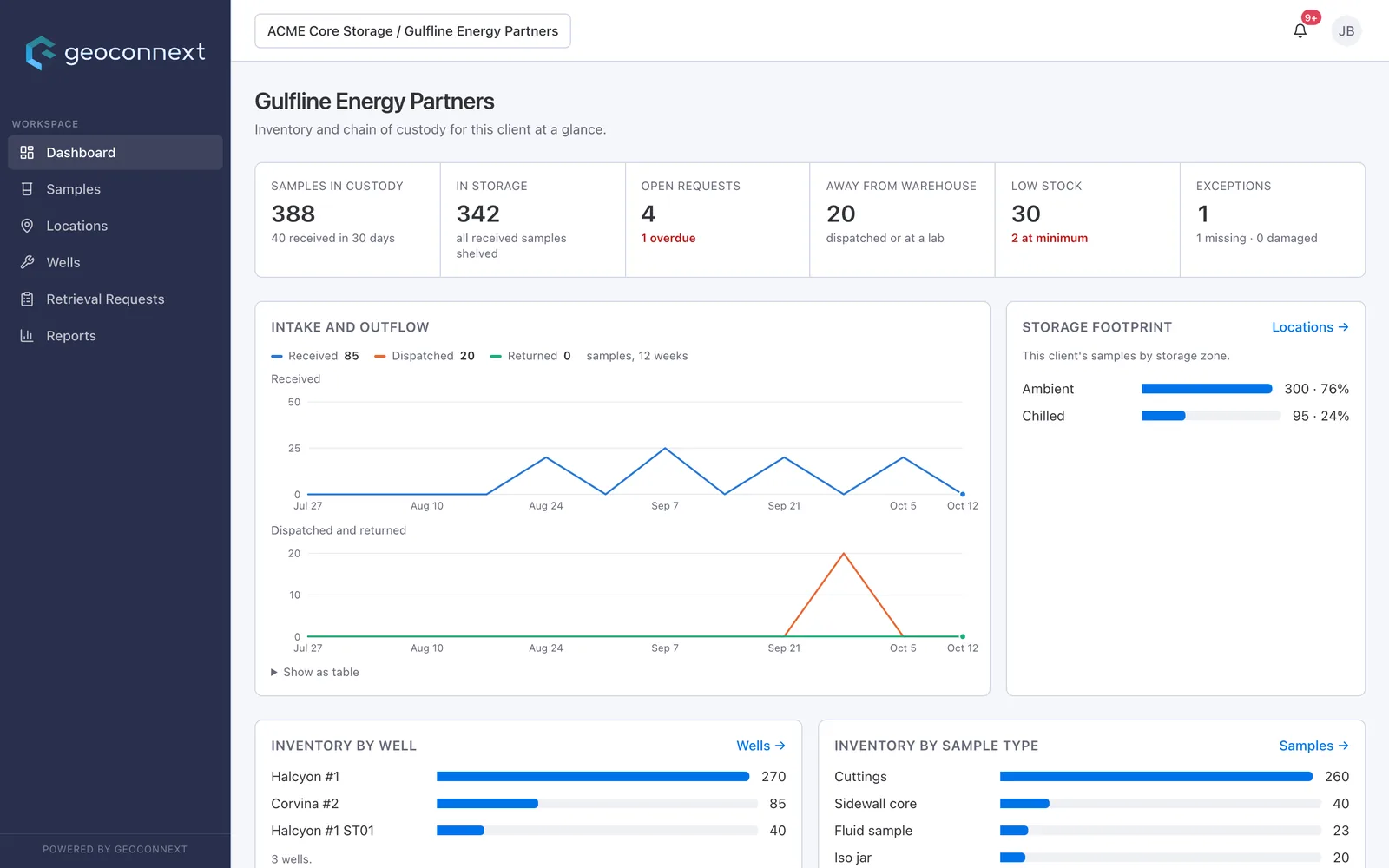
Gulfline Energy Partners' own dashboard as their user sees it: samples in custody, open requests, samples away and storage footprint.

Isolation you can test

Every record carries its organization and client workspace. Automated rules tests prove one client can't read another's data.

Read-only where it should be

Give a regulator or partner a view of their slice without any ability to change it.

Self-serve requests

Client staff with request access ask for samples from the portal and follow each request through approval, dispatch and return.

Records & reportsLive

Every sample's history, ready for an audit.

Every receipt, move, dispatch and return lands on the sample's timeline with a name and a time. Print a chain-of-custody record for any sample, export reports to CSV, and attach lab reports and photos to the sample itself.

1click from a sample's timeline to a printable chain-of-custody record.
See a custody record for your samples
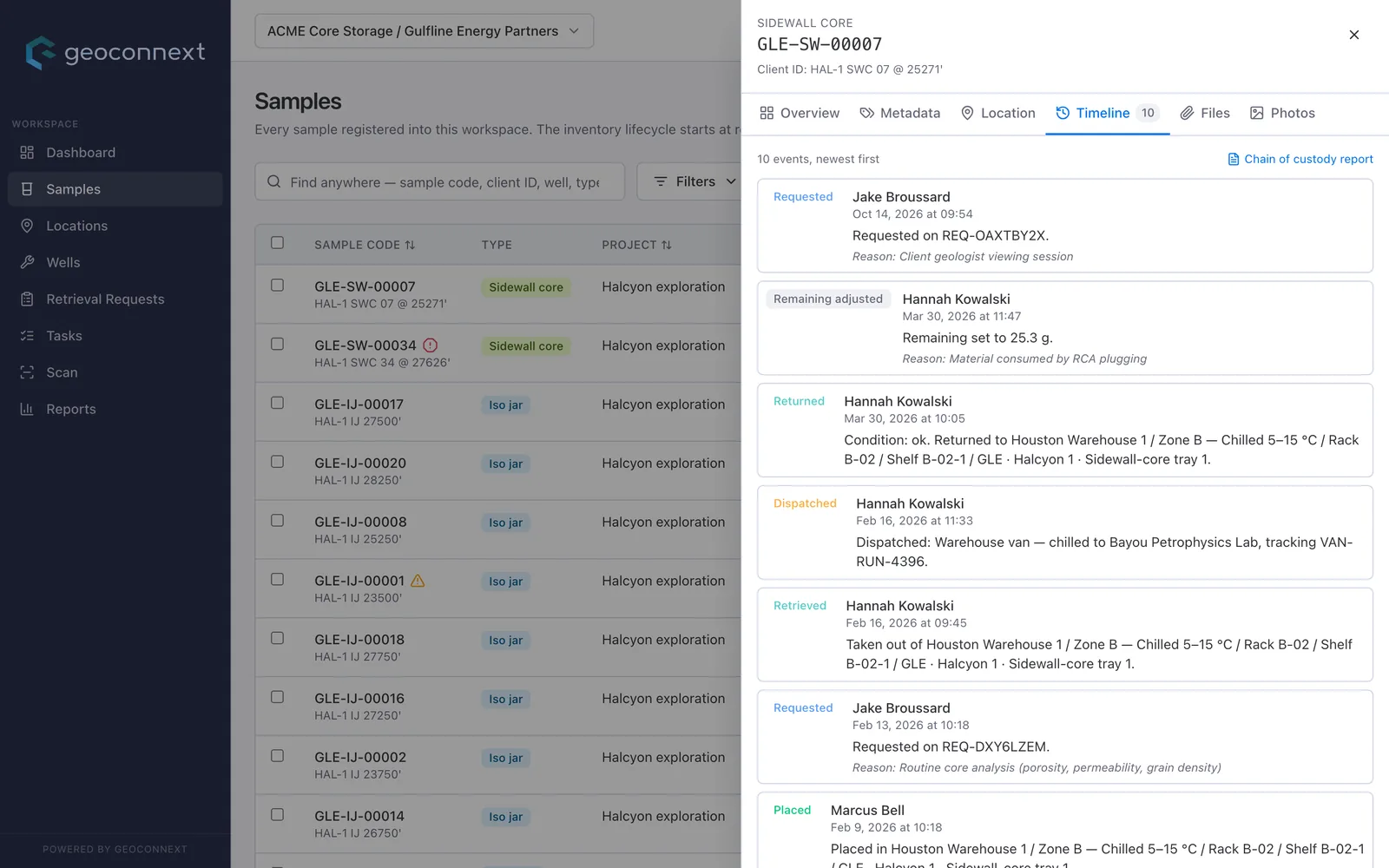
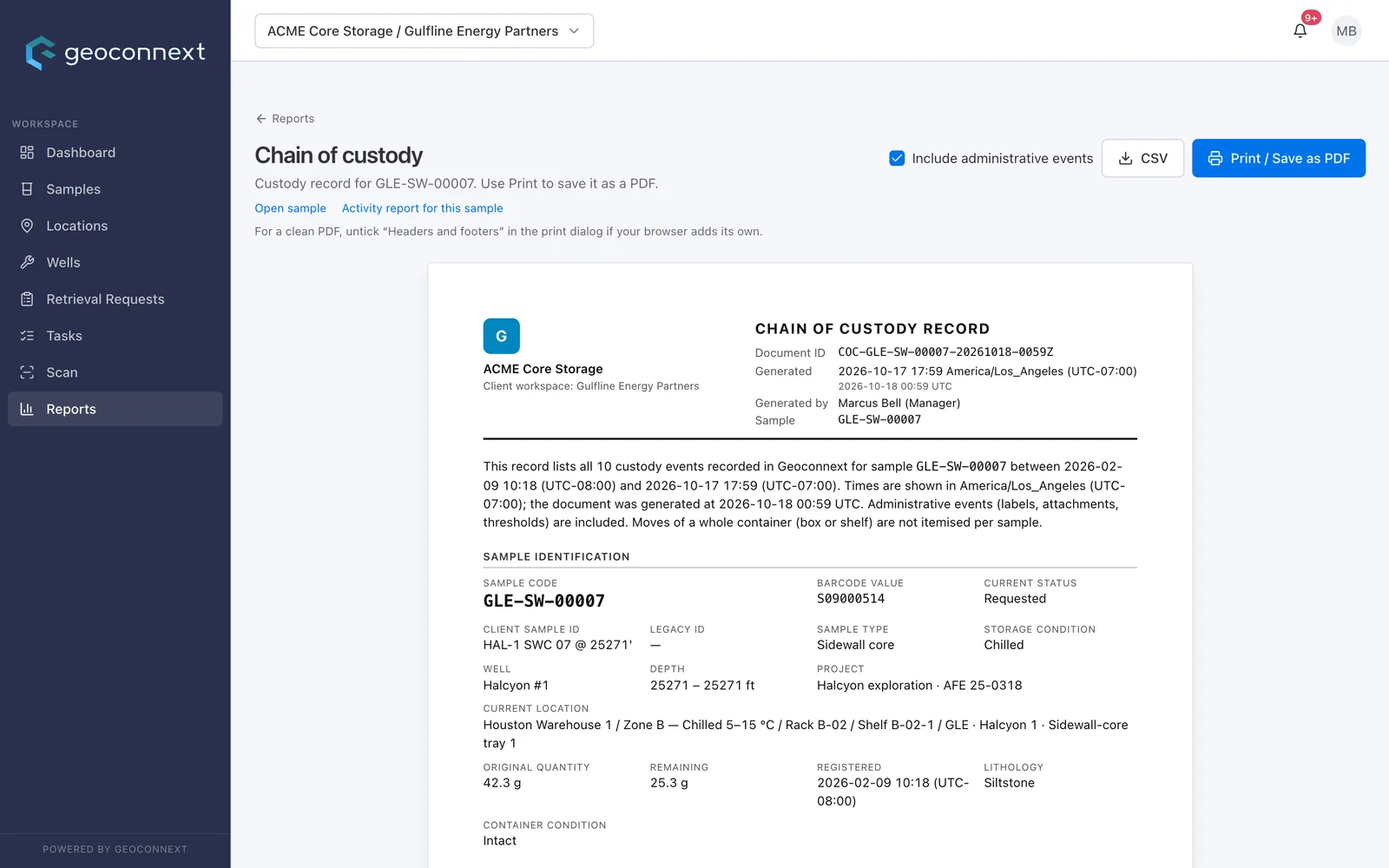
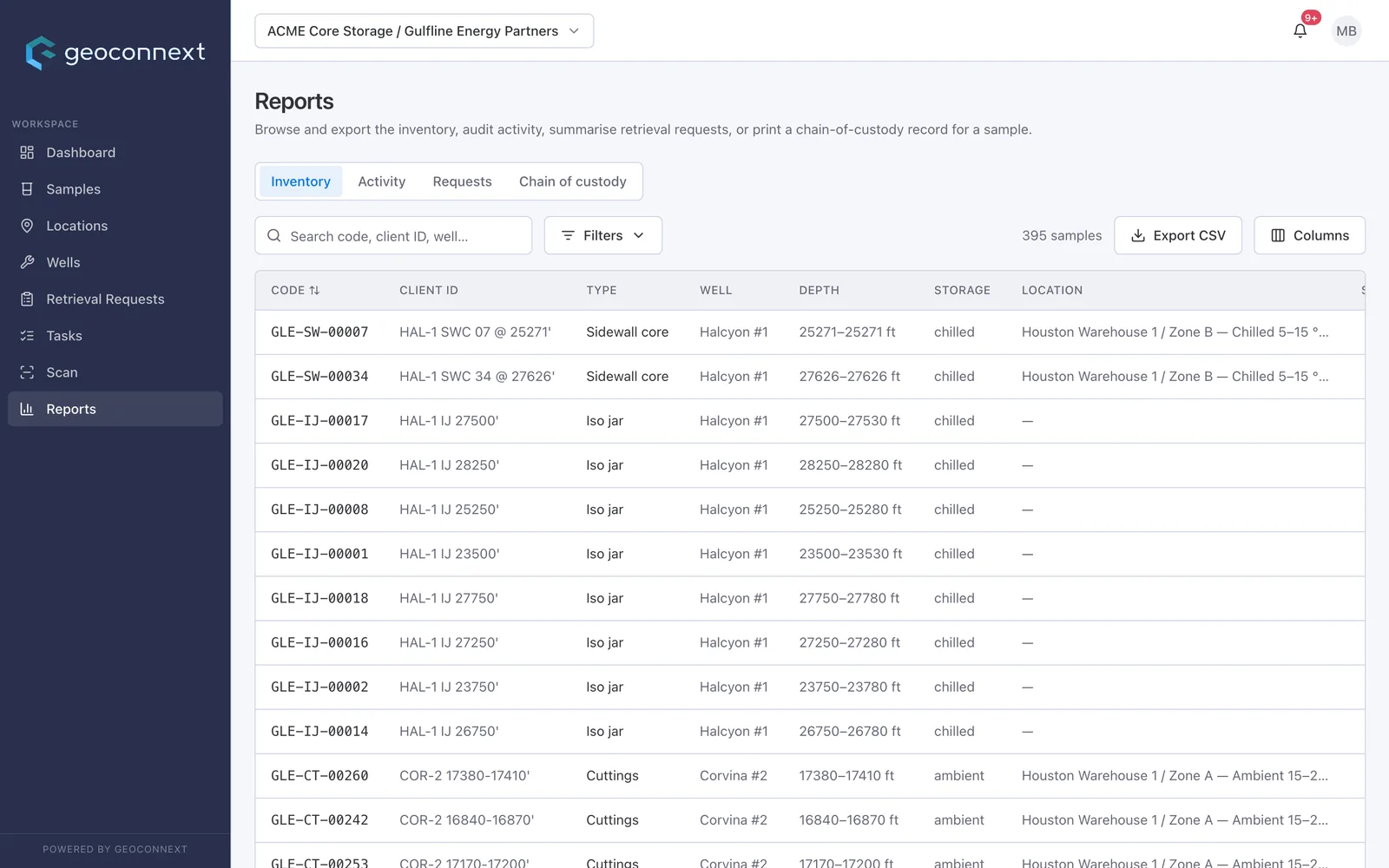
A sample's custody timeline: requested, retrieved, dispatched to the lab, returned and adjusted, each with a name and time. A printable chain-of-custody record with a document ID, ready to print or save as PDF. Reports for inventory, activity, requests and chain of custody, with CSV export.

Chain-of-custody record Live

A formal record with a document ID for any sample. Print it, save it as PDF, or export it as CSV.

Reports & CSV export Live

Inventory, activity and request reports, filtered your way and ready for Excel.

Lab status & turnaround Roadmap

Today you see which lab has each sample and for how long. Next: what stage the lab is at and whether turnaround is on track.

Configuration, files & photosLive

Built around your samples, not a template.

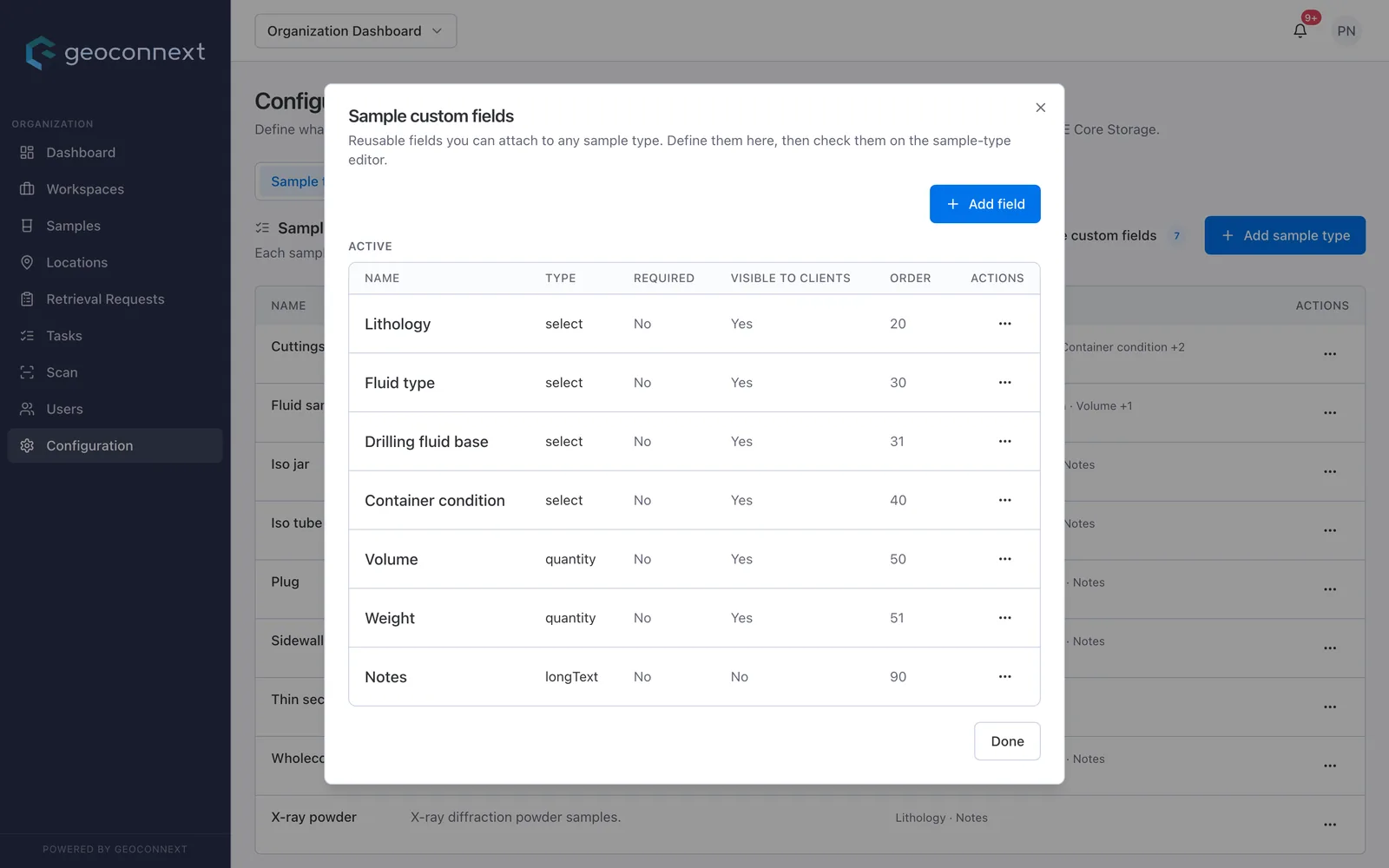
Admins define the sample types, location types and fields you work with, right in the app. Lab reports, spreadsheets and photos then live on the record they describe, uploaded from a desk or straight from a phone camera.

8field types: text, long text, number, date, date and time, yes/no, and single or multiple choice.
See it set up for your samples
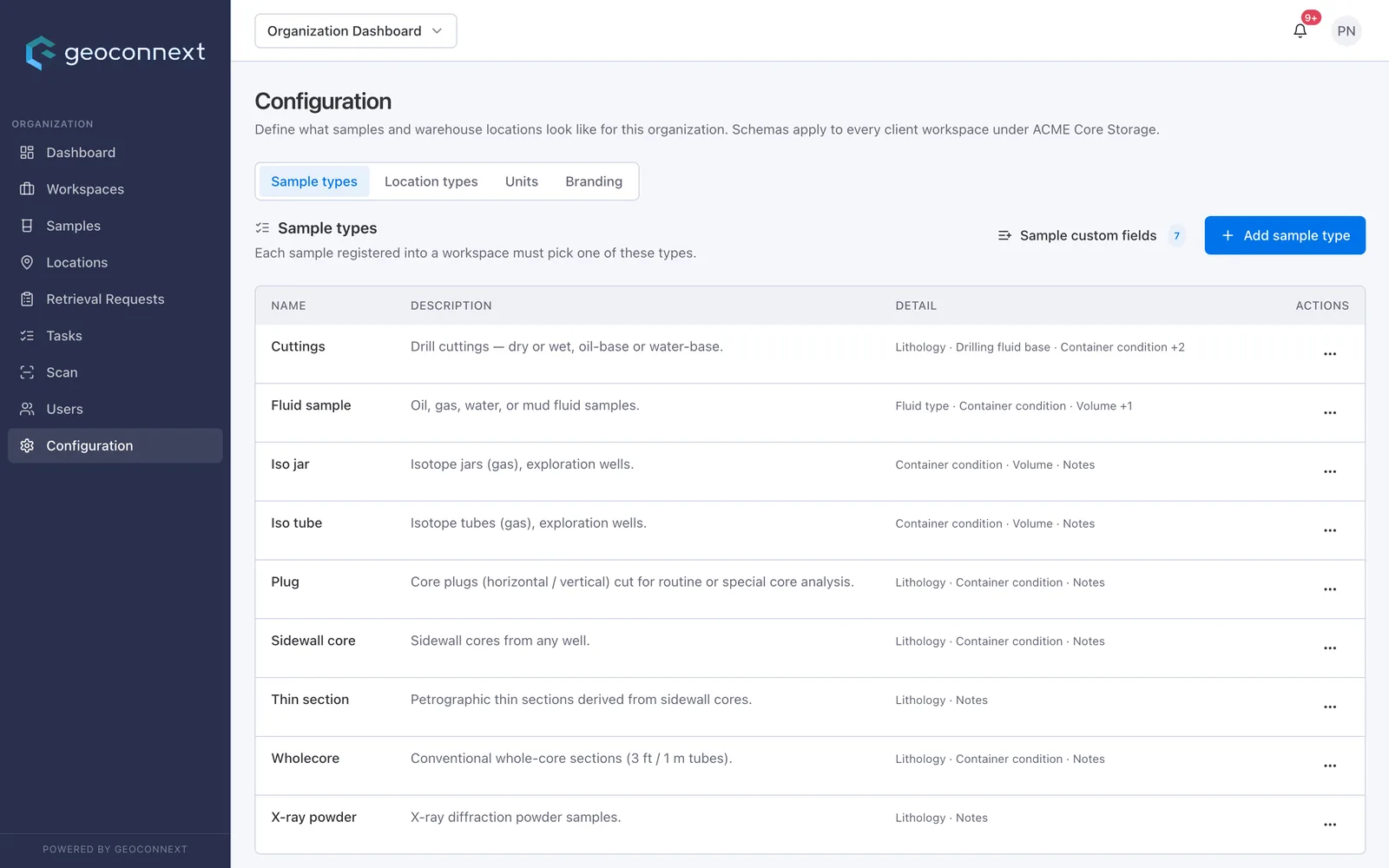
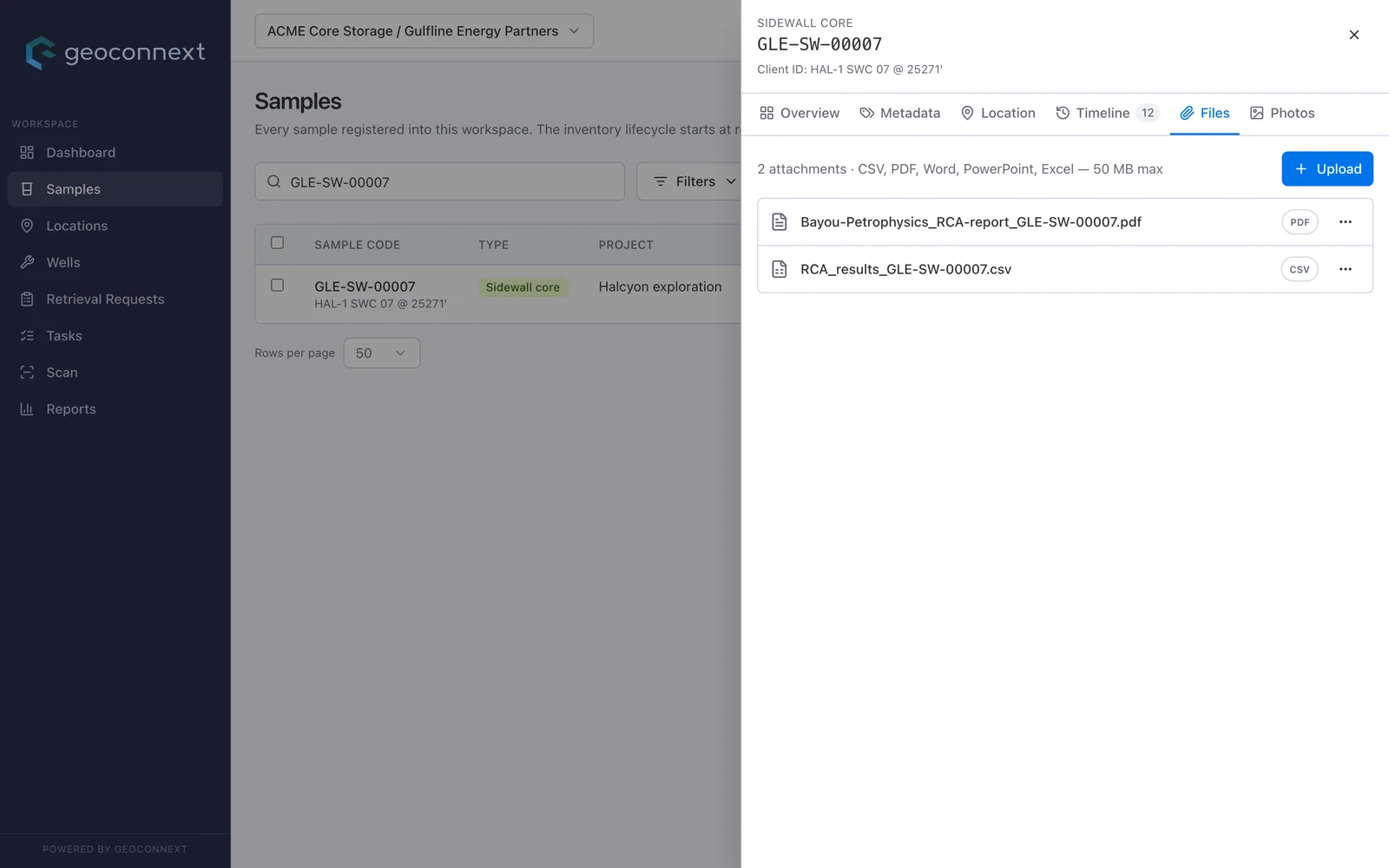
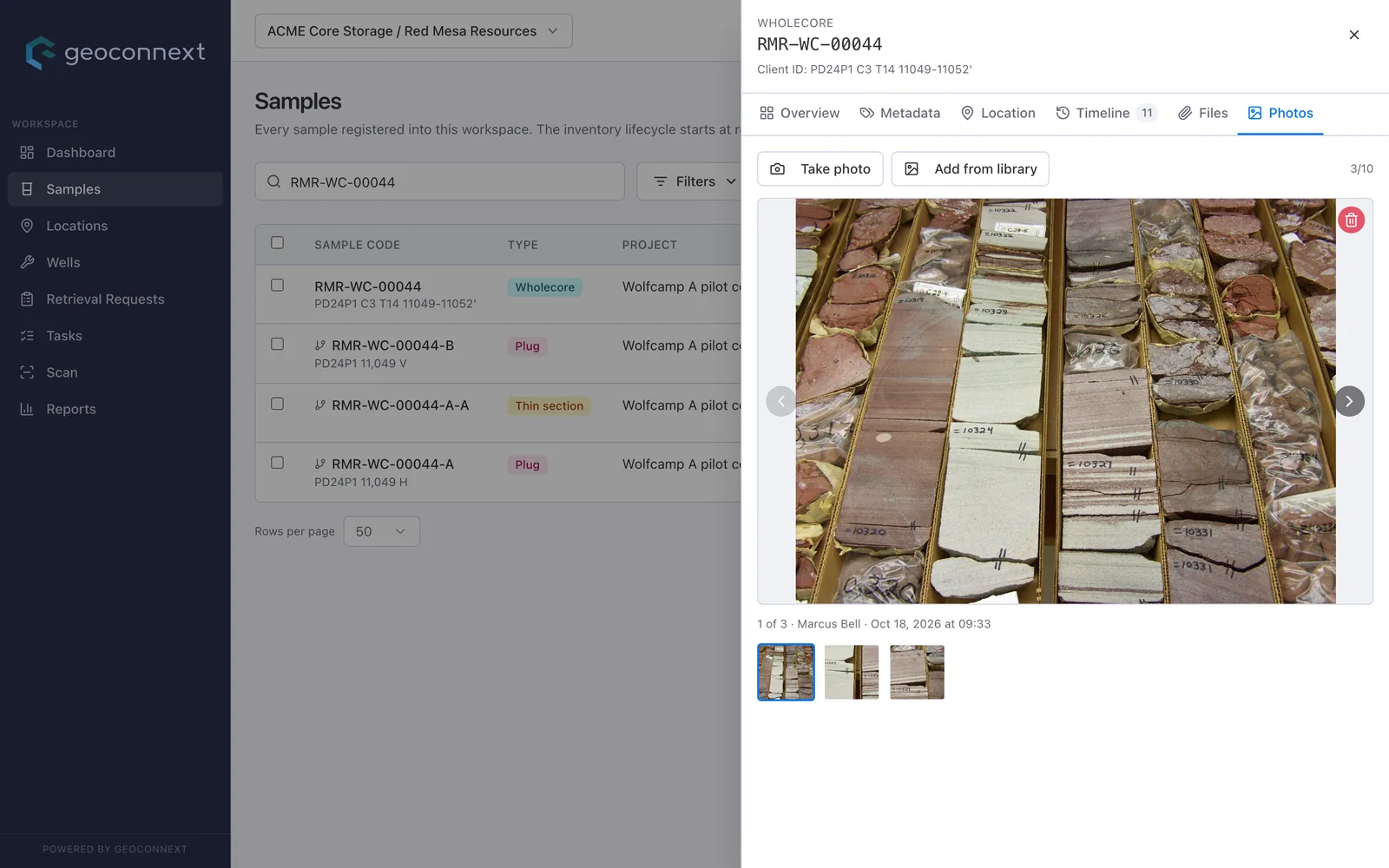
Configuration: the organization's sample types (cuttings, fluid samples, iso jars, plugs, sidewall and whole cores and more), each with its own fields. Custom fields with their type, whether they are required, and whether client users can see them. A sidewall core's Files tab with a lab report PDF and a results CSV attached. A whole-core sample's Photos tab: three photos of slabbed core, taken or added from the library.

Your types, your fields

Each sample and location type carries its own fields. Make a field required, filterable or sortable, and set up the units you measure in.

You choose what clients see

Every field has a visible-to-clients switch, so internal notes stay internal while clients see what they need.

Files and photos on the record

Attach CSV, PDF, Word, PowerPoint and Excel files up to 50 MB to a sample, and up to 10 photos to a sample, location or delivery. File uploads show on the sample's timeline.

Solutions

Built for everyone a sample passes through.

Run one warehouse for many clients without mixing their data.

Give each client its own workspace, keep one crew and one set of shelves, and onboard the next client by configuring a workspace.

Products you'd use
Warehouse & scanRetrieval & dispatchClient portals
See the operator walkthrough

Today

  • A spreadsheet per client, kept in sync by hand
  • Retrievals arranged by phone and email
  • Weeks to rebuild custody for an audit

With Geoconnext

  • One warehouse, a walled-off workspace per client
  • Requests, approvals and dispatch in one queue
  • Custody history for any sample in minutes
Customer story · Anchor pilot

A national core repository moves its custody record off spreadsheets.

A contract storage operator runs the national core repository for a state oil company: decades of cuttings, cores and fluid samples from dozens of wells, with thousands of new samples arriving every year.

Geoconnext gives the operator's crew a scan-first workflow on the warehouse floor, and gives the state custodian a live, read-only view of its own inventory.

Warehouse & scanRetrieval & dispatchClient portalsChain of custody
Pilot scope
Decadesof cuttings, cores and fluids to bring on the record
Dozensof wells, with more drilled every year
Thousandsof new samples arriving each year
Customer name and figures withheld.
Security & trust

Your samples are irreplaceable. So is their record.

Geoconnext is built so one client never sees another's data, every action leaves a trail, and nothing is lost to a bad day.

Isolation enforced by the database

Client workspaces are separated by security rules on every read and write, not just hidden in the interface.

Covered by an automated rules test suite

Role and workspace access

Admin, manager and operator roles for your team. Collaborator, viewer and requestor roles for client staff, scoped to their workspace.

Org roles + workspace roles

Audit log on everything

Sign-ins and custody events are logged, filterable by date and exportable to CSV.

Who, what, when, from where

Point-in-time recovery

Data can be restored to any moment in the last seven days, on top of daily and weekly backups.

7-day PITR · daily 7 d · weekly 14 w

Separate staging and production

Changes are tested in an isolated staging environment before they reach your data.

Two projects, no shared data

Encrypted in transit and at rest

Every connection uses HTTPS, and stored data is encrypted by the cloud platform by default.

TLS · encryption at rest
RoadmapNext on security: Multi-factor sign-inSingle sign-on (SAML)
Open by default

Your data leaves with you.

Export your records whenever you like, in formats your other systems already read. No lock-in and no waiting on us.

Read the data FAQ
CSVLive

Inventory reports and the audit log. Opens straight in Excel.

CustodyLive

A printable chain-of-custody report for any sample.

PPDMLive

Wells modelled on PPDM: UWI, field, basin, operator, total depth.

OSDURoadmap

Ingest and export aligned to OSDU subsurface entities.

PRODMLRoadmap

Fluid and lab results in a standard industry schema.

XLSX · TXTRoadmap

Native Excel workbooks and plain-text exports for older systems.

Pricing

Start with one warehouse. Grow by workspace.

Every plan includes the full sample record, scan workflows, custody history and exports.

Pilot

Prove it on one warehouse before you commit.

Fixed scope, fixed fee
  • One warehouse and one client workspace
  • Up to about 10,000 samples
  • Your sample types, conditions and location tree configured with you
  • Crew onboarding on the warehouse floor
Start a pilot
For storage operators

Operator

Run many clients from one platform.

Scales with your client workspaces
  • Multiple client workspaces and warehouses
  • Scan, retrieval, dispatch and return
  • Client portals with read-only access
  • Bulk import, labels and exports
Talk to sales

Enterprise

National repositories and large operators.

Annual contract
  • Everything in Operator
  • Custom roles and approval rules
  • Support SLA
  • Single sign-on when it ships
Contact us
FAQ

Questions we hear first.

Something else on your mind? We're happy to go through it on a call.

Talk to an expert
Does Geoconnext replace our LIMS?

No. A LIMS runs the lab bench. Geoconnext runs custody: the warehouse, the trip to the lab and back, and who can see what. The two sit side by side.

Can each client see only its own data?

Yes. Every record belongs to one client workspace, and the database's security rules check that on every read and write. An automated test suite covers those rules.

Can we bring our existing inventory?

Yes. Samples register in batches and move to locations in bulk, and labels print in batches so crews can tag legacy samples as they reach them. For a large spreadsheet register, we plan the migration with you.

What hardware do warehouse crews need?

A phone or tablet with a camera and a browser, plus a label printer for QR labels. There is nothing to install.

How long does a pilot take to go live?

A pilot covers one warehouse and one client workspace. We configure your sample types, storage conditions and location tree with you, so crews can start scanning within weeks.

Can we use our own sample types and fields?

Yes. Org admins define sample types, location types and their fields in the app, decide which fields are required and which clients can see, and set up the units you measure in. No code changes or vendor tickets.

Can we get our data out?

Any time. Inventory reports and the audit log export to CSV, and custody history prints as a report for any sample. Native Excel, OSDU and PRODML exports are on the roadmap.

Get started

Ready to put your samples on the record?

Tell us about your warehouse and your clients. We'll show you Geoconnext set up for your sample types.

45-minute walkthrough Your sample types and locations Nothing to install

Book a demo

45 minutes. We'll walk through your warehouse, your sample types and your clients.

We use these details only to reply to your request. See our privacy notice.

Product tour

    Real Geoconnext screens, fictional demo data.